In my previous blog posts () I’ve explained how to setup a dynamic pipeline with a control table. With that the ingestion job can be fully automated and scheduled for the appropriate frequency.
In this post I’ll write a bit about how we can manage schema changes in the source system. Schema change is dependent on the systems, some systems hardly have schema changes, but some of them can have even on a weekly basis. So this phenomenon is something we might think about when we setup our dynamic pipelines.
First of all let’s see what is happening if we don’t manage the schema in the pipeline and one of the source tables is modified. Let’s assume adding a new field somewhere in the middle of the table.
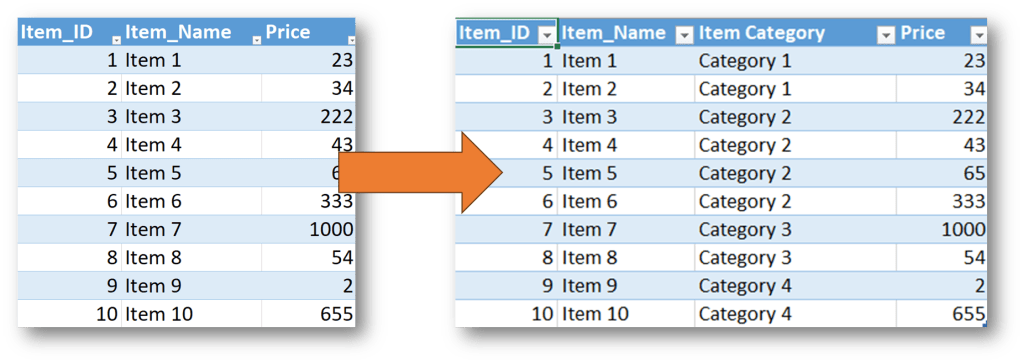
Here you can see what is happening if we run the pipeline after this change:
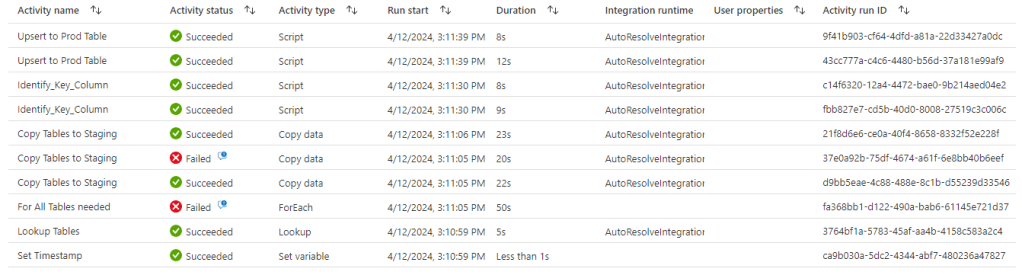
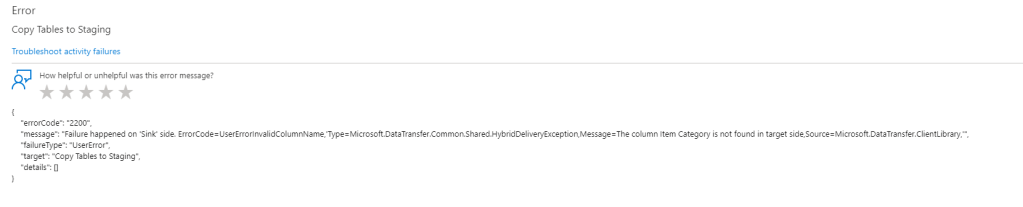
Yes, the pipeline couldn’t handle the changing schema and the Item table ingestion has failed.
So let’s see how we can fix that.
Step 1:
First of all we need to do a minor modification on the staging table. This is just staging so this is not a problem if there is a couple of minutes outage there so the schema change can be easily adjusted there if we don’t TRUNCATE the staging table at pipeline run, but DROP it. So let’s navigate to the COPY activity in the pipeline that’s copying source data to the staging data table and change the Pre-copy script to use DROP TABLE instead of TRUNCATE TABLE:
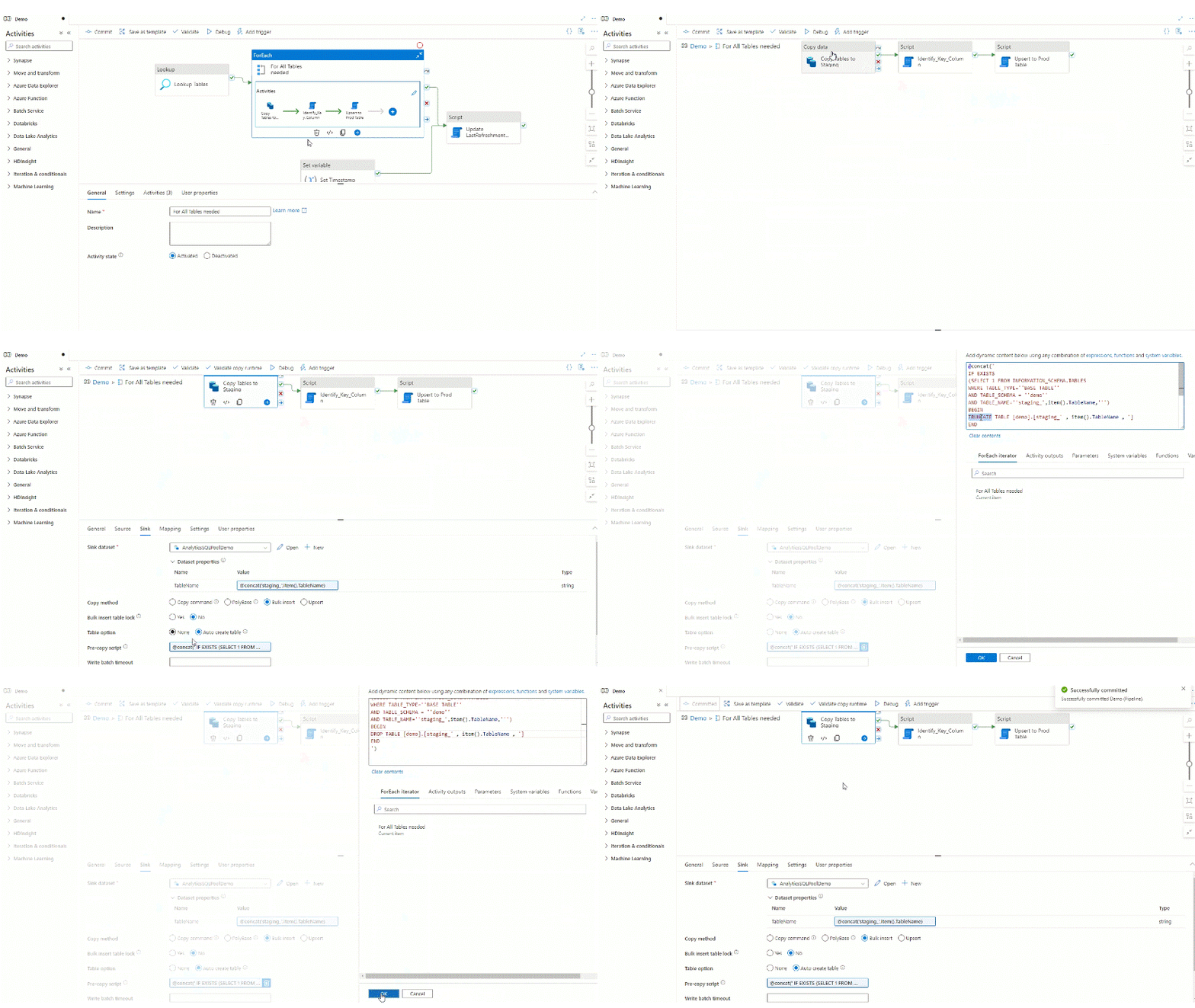
Let’s run debug with the new setting and see if anything has changed:
As expected the full pipeline is still not working, but compared to the previous run we can see that the copy activity succeed, and the issue is now in the UPSERT step so the schema difference is moved to be between our staging table and production table. Let’s check the tables themselves and we expect that the staging table already contains the new category column, but the prod table still excludes it:

Definitely the easiest solution would be to do the same with the production table to DROP it, and replace it with the new schema, but most of the time this cannot be done in a production environment due to historized data, need to have nearly 100% availability, etc. So we need to adjust the schema in a different way that ensure the lowest outage time and keeping data in the prod table.
Step 2:
So our next step will be to adjust the production table’s schema. We will use the schema of our staging table for that. This step is a bit more complicated than the first step and consists of multiple sub-steps. Let’s start the process with static value in SQL editor just to understand the logic first:
What we need to do is the following:
- Identify the Prod schema
- Identify the Staging Schema
- Identify the new and/or removed columns
- setup a string for the new schema column ordering
- add/remove the necessary columns from/to prod table
- run column reordering based on staging schema to prod table
Let’s start with the first two as they are pretty identical to each others. For me the schema is the same called ‘demo’ and I differentiate staging from prod with a ‘staging_’ prefix. Definitely most of the times staging is a schema so in a normal environment the different in the code might rather be the table_schema:
SELECT COLUMN_NAME
,CASE WHEN CHARACTER_MAXIMUM_LENGTH = -1 THEN CONCAT(DATA_TYPE,'(max)’)
WHEN CHARACTER_MAXIMUM_LENGTH is not null THEN CONCAT(DATA_TYPE,'(‘,CHARACTER_MAXIMUM_LENGTH,’)’)
WHEN NUMERIC_PRECISION is not null THEN CONCAT(DATA_TYPE,'(‘,NUMERIC_PRECISION,’,’,NUMERIC_SCALE,’)’)
ELSE DATA_TYPE
END as ‘DataType’
FROM INFORMATION_SCHEMA.COLUMNS
WHERE TABLE_NAME = ‘staging_Item’
AND TABLE_SCHEMA = ‘demo’

Same for the Prod table, without the ‘staging_’ prefix – note the missing Item Category column:
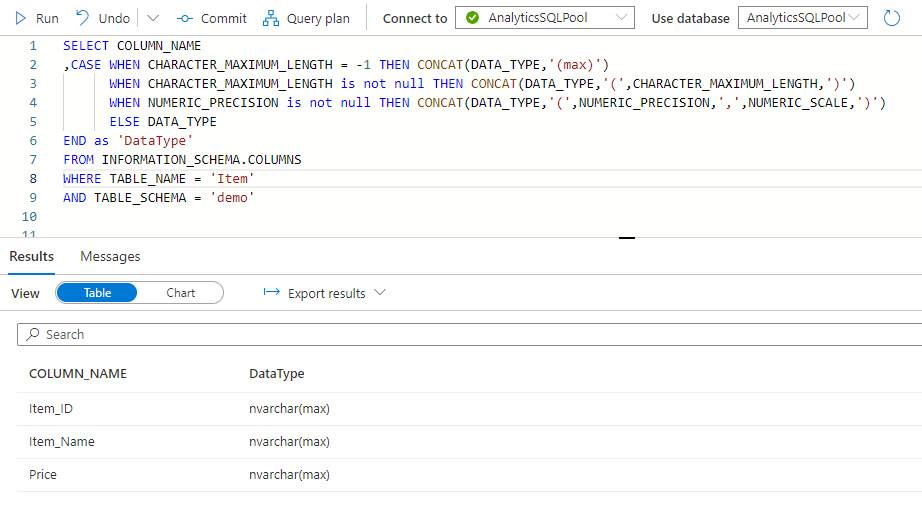
Now we need to create some strings with that we will work in the next steps when adding the new column and reordering the cols. We need four different strings for that:
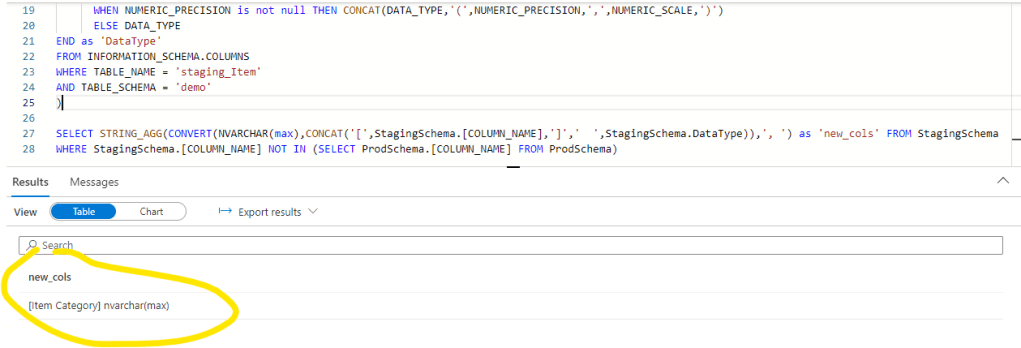
New column with type – for column creation in prod (now with the above queries in CTE, for the 3 rest I will show only the different string creation):
WITH ProdSchema AS
(
SELECT COLUMN_NAME
,CASE WHEN CHARACTER_MAXIMUM_LENGTH = -1 THEN CONCAT(DATA_TYPE,'(max)’)
WHEN CHARACTER_MAXIMUM_LENGTH is not null THEN CONCAT(DATA_TYPE,'(‘,CHARACTER_MAXIMUM_LENGTH,’)’)
WHEN NUMERIC_PRECISION is not null THEN CONCAT(DATA_TYPE,'(‘,NUMERIC_PRECISION,’,’,NUMERIC_SCALE,’)’)
ELSE DATA_TYPE
END as ‘DataType’
FROM INFORMATION_SCHEMA.COLUMNS
WHERE TABLE_NAME = ‘Item’
AND TABLE_SCHEMA = ‘demo’
)
,StagingSchema AS
(
SELECT COLUMN_NAME
,CASE WHEN CHARACTER_MAXIMUM_LENGTH = -1 THEN CONCAT(DATA_TYPE,'(max)’)
WHEN CHARACTER_MAXIMUM_LENGTH is not null THEN CONCAT(DATA_TYPE,'(‘,CHARACTER_MAXIMUM_LENGTH,’)’)
WHEN NUMERIC_PRECISION is not null THEN CONCAT(DATA_TYPE,'(‘,NUMERIC_PRECISION,’,’,NUMERIC_SCALE,’)’)
ELSE DATA_TYPE
END as ‘DataType’
FROM INFORMATION_SCHEMA.COLUMNS
WHERE TABLE_NAME = ‘staging_Item’
AND TABLE_SCHEMA = ‘demo’
)
SELECT STRING_AGG(CONVERT(NVARCHAR(max),CONCAT(‘[‘,StagingSchema.[COLUMN_NAME],’]’,’ ‘,StagingSchema.DataType)),’, ‘) as ‘new_cols’ FROM StagingSchema
WHERE StagingSchema.[COLUMN_NAME] NOT IN (SELECT ProdSchema.[COLUMN_NAME] FROM ProdSchema)
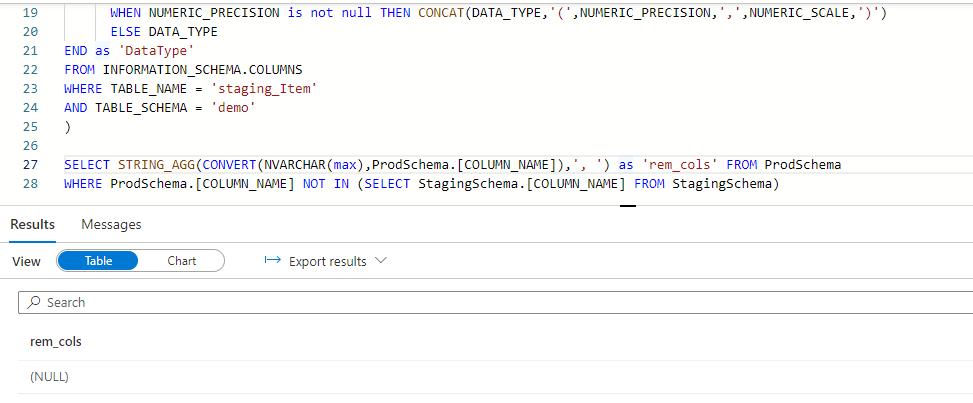
rem_columns – removed columns – this one will not show anything in our current demo case, but it can also happen that a column is deleted from the source data:
SELECT STRING_AGG(CONVERT(NVARCHAR(max),ProdSchema.[COLUMN_NAME]),’, ‘) as ‘rem_cols’ FROM ProdSchema
WHERE ProdSchema.[COLUMN_NAME] NOT IN (SELECT StagingSchema.[COLUMN_NAME] FROM StagingSchema)
And the full code we use:
WITH ProdSchema AS
(
SELECT COLUMN_NAME
,CASE WHEN CHARACTER_MAXIMUM_LENGTH = -1 THEN CONCAT(DATA_TYPE,'(max)’)
WHEN CHARACTER_MAXIMUM_LENGTH is not null THEN CONCAT(DATA_TYPE,'(‘,CHARACTER_MAXIMUM_LENGTH,’)’)
WHEN NUMERIC_PRECISION is not null THEN CONCAT(DATA_TYPE,'(‘,NUMERIC_PRECISION,’,’,NUMERIC_SCALE,’)’)
ELSE DATA_TYPE
END as ‘DataType’
FROM INFORMATION_SCHEMA.COLUMNS
WHERE TABLE_NAME = ‘Item’
AND TABLE_SCHEMA = ‘demo’
)
,StagingSchema AS
(
SELECT COLUMN_NAME
,CASE WHEN CHARACTER_MAXIMUM_LENGTH = -1 THEN CONCAT(DATA_TYPE,'(max)’)
WHEN CHARACTER_MAXIMUM_LENGTH is not null THEN CONCAT(DATA_TYPE,'(‘,CHARACTER_MAXIMUM_LENGTH,’)’)
WHEN NUMERIC_PRECISION is not null THEN CONCAT(DATA_TYPE,'(‘,NUMERIC_PRECISION,’,’,NUMERIC_SCALE,’)’)
ELSE DATA_TYPE
END as ‘DataType’
FROM INFORMATION_SCHEMA.COLUMNS
WHERE TABLE_NAME = ‘staging_Item’
AND TABLE_SCHEMA = ‘demo’
)
,new_cols AS
(
SELECT STRING_AGG(CONVERT(NVARCHAR(max),CONCAT(‘[‘,StagingSchema.[COLUMN_NAME],’]’,’ ‘,StagingSchema.DataType)),’, ‘) as ‘new_cols’ FROM StagingSchema
WHERE StagingSchema.[COLUMN_NAME] NOT IN (SELECT ProdSchema.[COLUMN_NAME] FROM ProdSchema)
)
,rem_cols AS
(
SELECT STRING_AGG(CONVERT(NVARCHAR(max),ProdSchema.[COLUMN_NAME]),’, ‘) as ‘rem_cols’ FROM ProdSchema
WHERE ProdSchema.[COLUMN_NAME] NOT IN (SELECT StagingSchema.[COLUMN_NAME] FROM StagingSchema))
SELECT * FROM rem_cols JOIN new_cols ON 1=1
We need to add this code as a script activity to our pipeline and we also need to modify the code a little bit: We need to modify single quotes to dubled single quotes that the script activity can handle and make the table name dynamic – as now we are adjusting the Item table, but we want the flow to dynamically do the same on demand for other tables like for Customer, etc.
So let’s add a Script activity within the for each object and setup the following.

The next step is the setup the new order of the columns and also transform it as a string. We will use the following code to retrieve it from the staging table schema:
WITH StagingCols AS
(
SELECT
COLUMN_NAME, ORDINAL_POSITION
FROM INFORMATION_SCHEMA.COLUMNS
WHERE
TABLE_NAME = ‘staging_Item’
AND TABLE_SCHEMA = ‘demo’
)
SELECT STRING_AGG(CONCAT(‘[‘,CONVERT(NVARCHAR(max),COLUMN_NAME),’]’),’, ‘) WITHIN GROUP (ORDER BY ORDINAL_POSITION) as ‘select_string’
FROM StagingCols
And let’s transform this code to a pipeline script activity input same as we did for the previous step:
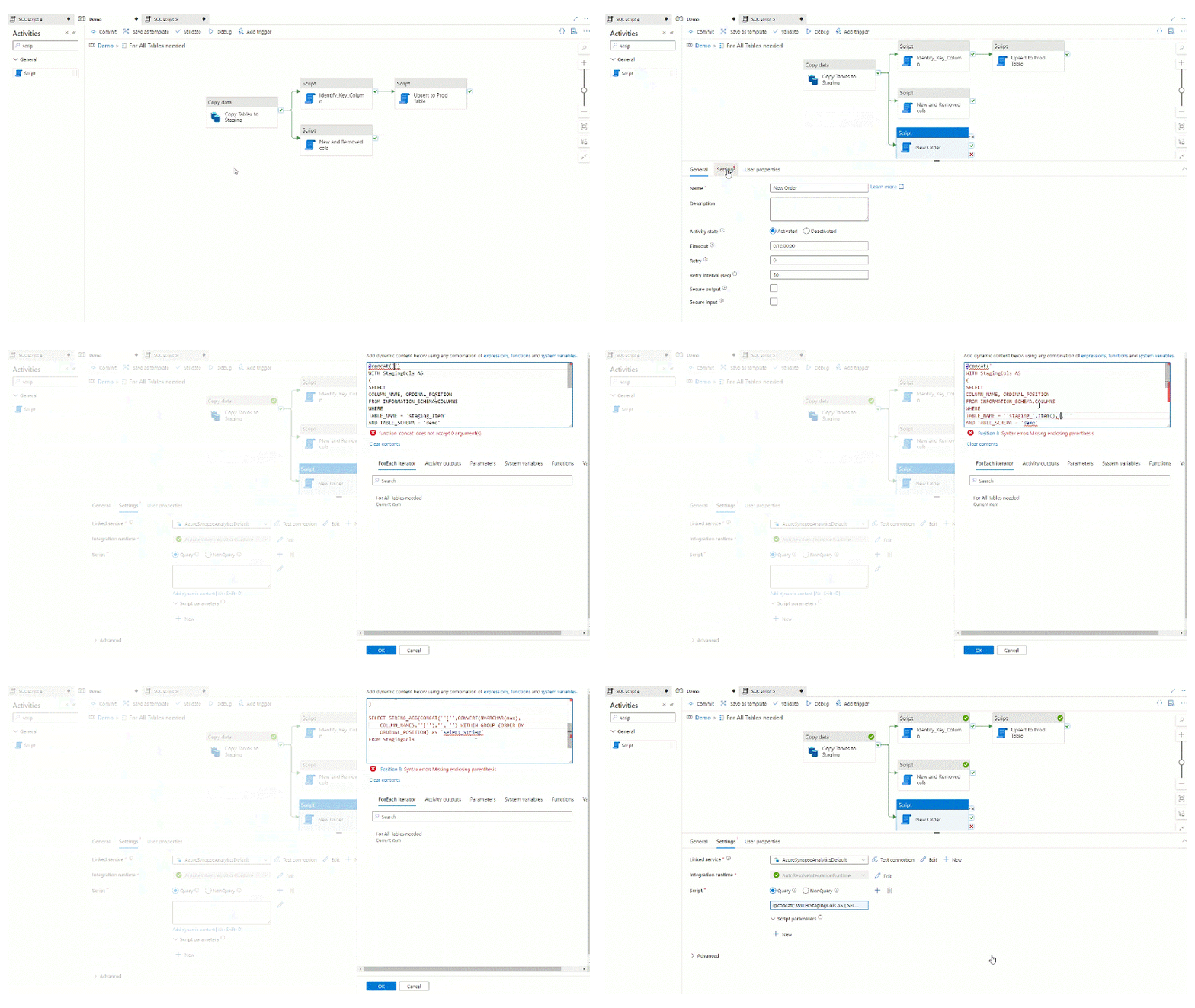
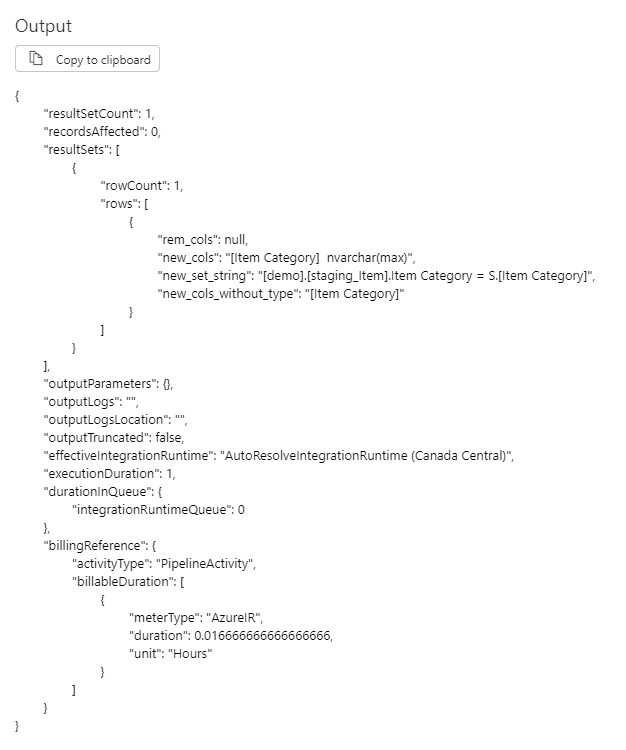
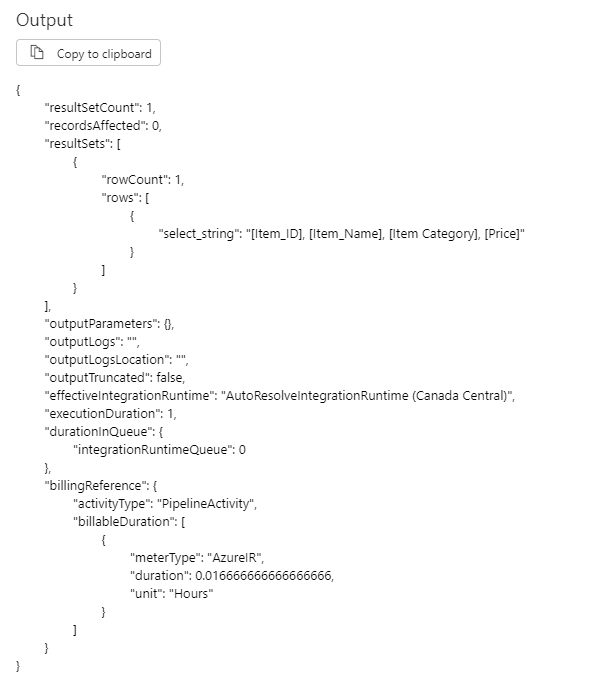
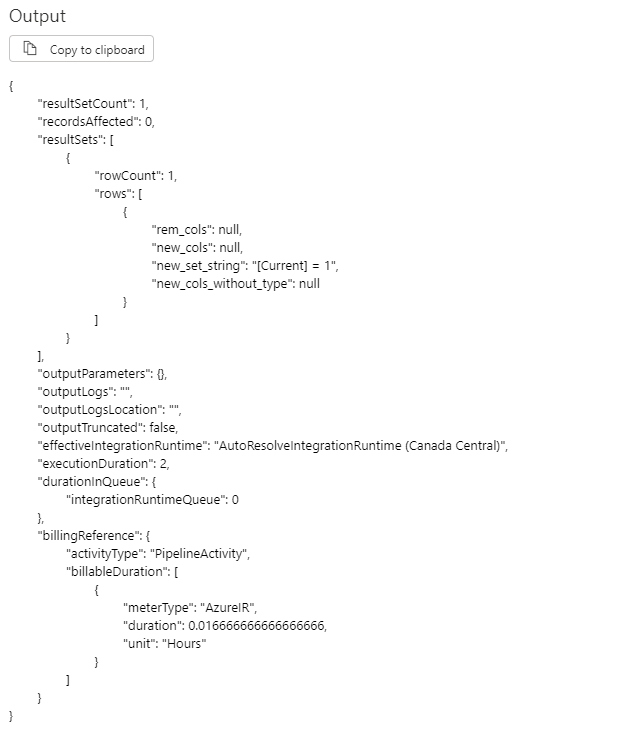
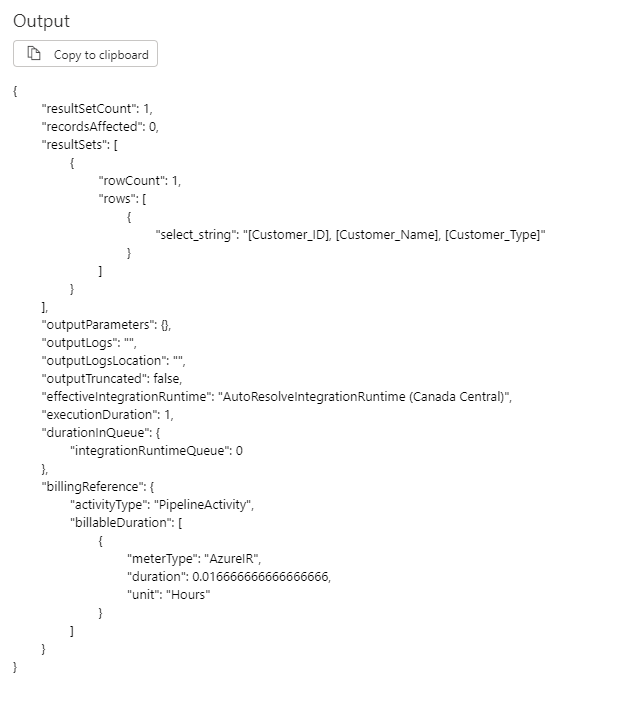
Let’s take a look of the output of those scripts for the Item table and for a table that has not changed:
For Item:
For not changed table:
And here comes the last step when we adjust the production table by adding or removing the changed columns accordingly.
Here is the full code we will use in the script and then let’s find the explanation by pieces:
@if(
and(
equals(
activity(‘New and Removed cols’).output.ResultSets[0].rows[0].new_cols
,null
)
,equals(
activity(‘New and Removed cols’).output.ResultSets[0].rows[0].rem_cols
,null
)
)
,’SELECT ”do nothing” as ”string”’
,concat(‘
ALTER TABLE [demo].[‘ , item().TableName , ‘]
‘,if(
equals(
activity(‘New and Removed cols’).output.ResultSets[0].rows[0].new_cols
,null
)
,’SELECT ”no new cols” as ”string”’
,concat(‘ADD ‘, activity(‘New and Removed cols’).output.ResultSets[0].rows[0].new_cols)
) ,’
‘ ,if(
equals(
activity(‘New and Removed cols’).output.ResultSets[0].rows[0].rem_cols
,null
)
,’SELECT ”no removed cols” as ”string”’
,concat(‘DROP COLUMN ‘, activity(‘New and Removed cols’).output.ResultSets[0].rows[0].rem_cols)
),’
CREATE TABLE [demo].[‘ , item().TableName , ‘_Reord]
WITH
(
DISTRIBUTION = ‘ , if(equals(item().Type,’Fact’) , ‘ROUND_ROBIN’ ,’REPLICATE’)
,’,HEAP
)
AS
SELECT ‘ , activity(‘New Order’).output.ResultSets[0].rows[0].select_string , ‘
FROM [demo].[‘ , item().TableName , ‘]
DROP TABLE [demo].[‘ , item().TableName , ‘]
CREATE TABLE [demo].[‘ , item().TableName , ‘]
WITH
(
DISTRIBUTION = ‘ , if(equals(item().Type,’Fact’) , ‘ROUND_ROBIN’ ,’REPLICATE’)
,’,HEAP
)
AS
SELECT * FROM [demo].[‘ , item().TableName , ‘_Reord]
DROP TABLE [demo].[‘ , item().TableName , ‘_Reord]
‘))
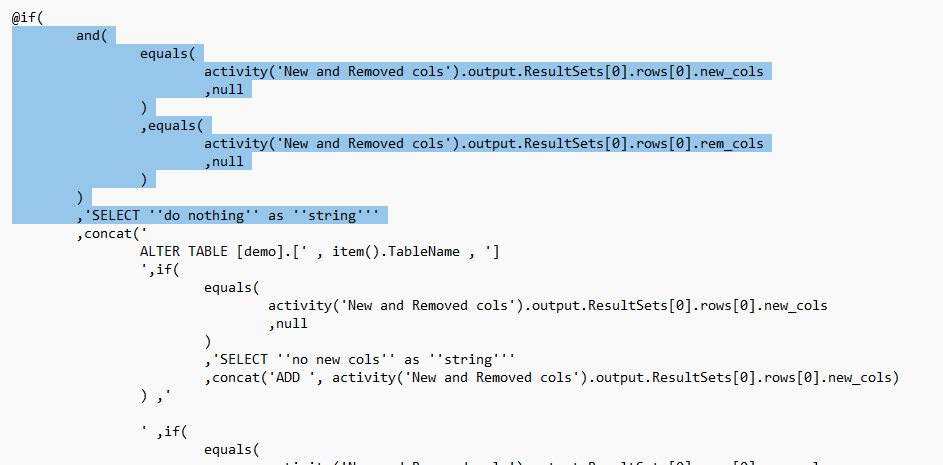
First we check if there are any added or removed columns. if not, than the script is just writing out ‘do nothing’ and that’s all:
Next step we check on the removed and/or added columns and we alter the prod table accordingly:

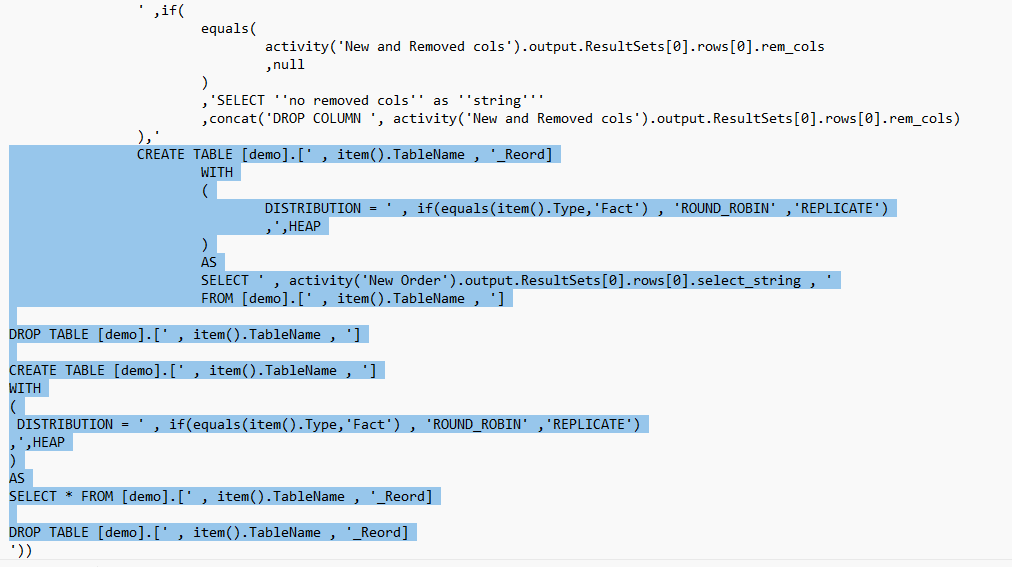
And the last part is my process to modify the order of the columns. This piece of code is basically quickly copies the full table with the new order with a _Reord suffix and then copies back to the original table. The outage of the table is a few seconds with this method so the availability is not really harmed and we also keep the proper settings of the table:
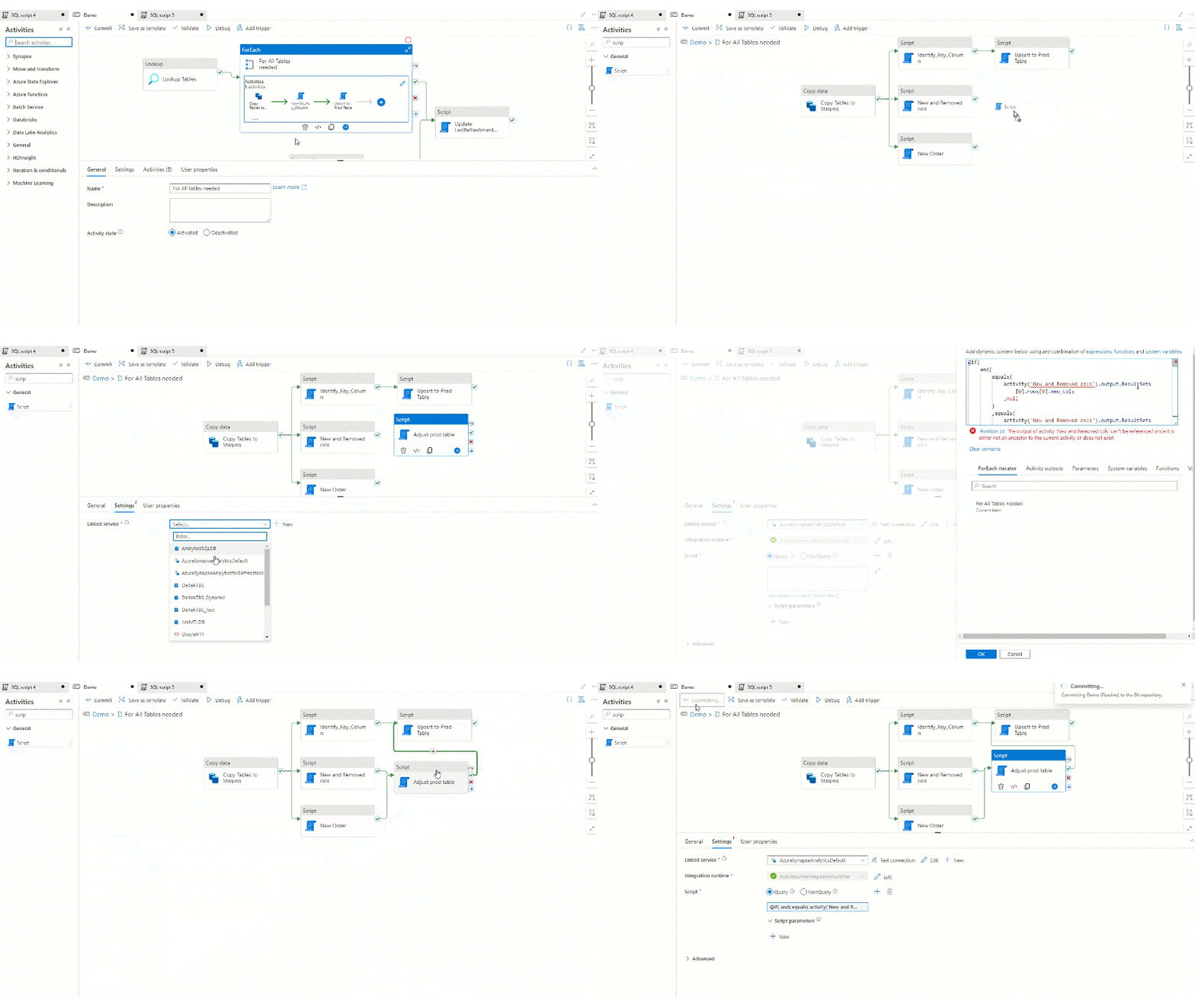
So let’s add this script to the pipeline also within the for each loop after the two previous scripts and before the Upsert activity:
And let’s see now what is happening if we run the pipeline:
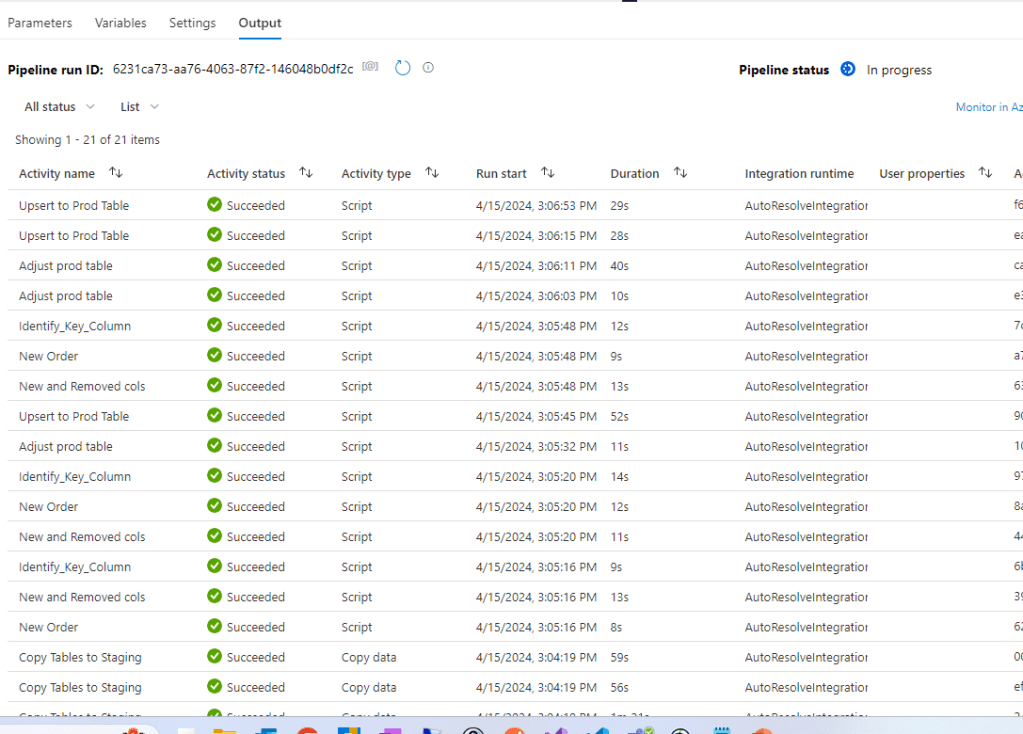
And the data is in the table:

That’s basically it. Definitely a lot of moving parts might be handled but this is a basic method that can be extended accordingly. Hope it will help you next time you plan this in your pipeline.

 Adam's Perspective on Data
Leave a comment