In the last couple of days I was working on migrating my Synapse Analytics pipelines from one tenant to the other. One of my challenges was the Salesforce data ingesting. As it can be found on Microsoft’s site, the Salesforce connector has changed to V2, and all pipelines should be updated latest by the Oct 2024.
Now with the migration I did that and actually it was a bit more tough as I thought to be. Please find here my solution overriding the difficulties.
The most important developments could be seen in the video, but there are some additional steps that I had to do to make my pipelines fully work. Let’s take a look at them:
First of all I usually do an incremental data load and now copying all records from the objects. This behavior requires an SOQL statement instead of having the full object copied over:

Previously I used the following syntax for the SOQL query:
SELECT * FROM [Account] WHERE [LastModifiedDate] > ‘2024-06-28T12:00:00’
Let’s see what’s happening this case. I’ve got an error for the copy activity with the following message:
{ “errorCode”: “2200”, “message”: “Failure happened on ‘Source’ side. ErrorCode=SalesforceHttpResponseNotSuccessCodeException,’Type=Microsoft.DataTransfer.Common.Shared.HybridDeliveryException,Message=The API request to Salesforce failed. Request Url: https://caehealthcare.my.salesforce.com/services/data/v52.0/jobs/query, Status Code: BadRequest, Error message: [{\”errorCode\”:\”INVALIDJOB\”,\”message\”:\”Query parsing error: unexpected token: ‘[‘\”}],Source=Microsoft.Connectors.Salesforce,’”, “failureType”: “UserError”, “target”: “Copy Salesforce Account”, “details”: [] }
ok, let’s try to remove the brackets:
SELECT * FROM Account WHERE LastModifiedDate > ‘2024-06-28T12:00:00’
another error is there:
{ “errorCode”: “2200”, “message”: “Failure happened on ‘Source’ side. ErrorCode=SalesforceHttpResponseNotSuccessCodeException,’Type=Microsoft.DataTransfer.Common.Shared.HybridDeliveryException,Message=The API request to Salesforce failed. Request Url: https://caehealthcare.my.salesforce.com/services/data/v52.0/jobs/query, Status Code: BadRequest, Error message: [{\”errorCode\”:\”INVALIDJOB\”,\”message\”:\”Query parsing error: unexpected token: ‘SELECT *’\”}],Source=Microsoft.Connectors.Salesforce,’”, “failureType”: “UserError”, “target”: “Copy Salesforce Account”, “details”: [] }
After analyzing the new connector SOQL syntax rules, it seems that SELECT * is not supported any more. The SF site recommends to use the FIELDS(ALL) formula instead, so first let’s take a trial:
SELECT FIELDS(ALL) FROM Account WHERE LastModifiedDate > ‘2024-06-28T12:00:00’
Nope, not working. Found some articles recommends the FIELDS(STANDARD) instead of FIELDS(ALL). Ok, Now it is accepted, but still receiving an error message:
{ “errorCode”: “2200”, “message”: “Failure happened on ‘Source’ side. ErrorCode=SalesforceHttpResponseNotSuccessCodeException,’Type=Microsoft.DataTransfer.Common.Shared.HybridDeliveryException,Message=The API request to Salesforce failed. Request Url: https://caehealthcare.my.salesforce.com/services/data/v52.0/jobs/query, Status Code: BadRequest, Error message: [{\”errorCode\”:\”API_ERROR\”,\”message\”:\”Selecting compound data not supported in Bulk Query\”}],Source=Microsoft.Connectors.Salesforce,’”, “failureType”: “UserError”, “target”: “Copy Salesforce Account”, “details”: [] }
This is about the compound data type, that I’ve briefly explained in the video as well. In Salesforce there are so called compound fields, like addresses, which are put together of many stand-alone parts, like Billing Address is made of Billing Country, Billing City, Billing Street, etc. Actually all the granular data is part of the object and can be pulled to DWH separately, but the compound Billing Address field has a data type that SQL DWH cannot handle.
In the video we could exlude those fields from the table creation, but definitely in this next step we should also exclude them from the query. And with this objective the FIELDS(STANDARD) formula will not work for us any more, and we need to explicitely define the fields we would like to pull from salesforce.
To achieve this we can utilize the already created table’s schema with a new script in the pipeline before the copy activity:
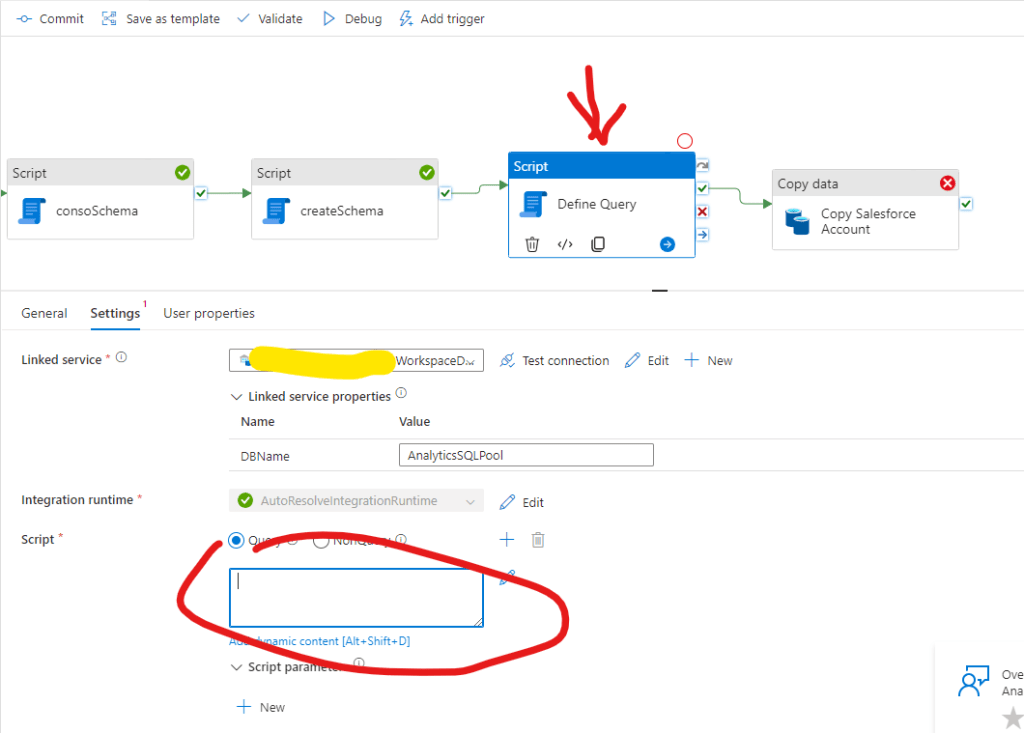
And we can add the following dynamic script within the Script:
@concat(‘
SELECT STRING_AGG(CONVERT(NVARCHAR(max),COLUMN_NAME),”, ”) WITHIN GROUP (ORDER BY [ORDINAL_POSITION]) as ”query” FROM INFORMATION_SCHEMA.COLUMNS oschema WHERE oschema.[TABLE_SCHEMA] = ”demo” AND oschema.[TABLE_NAME] = ”Account”
‘)
This script will create a string with the field names in the proper order that we can reference in the SOQL query of the copy activity. For this we can copy the current query and replace with a dynamic content:
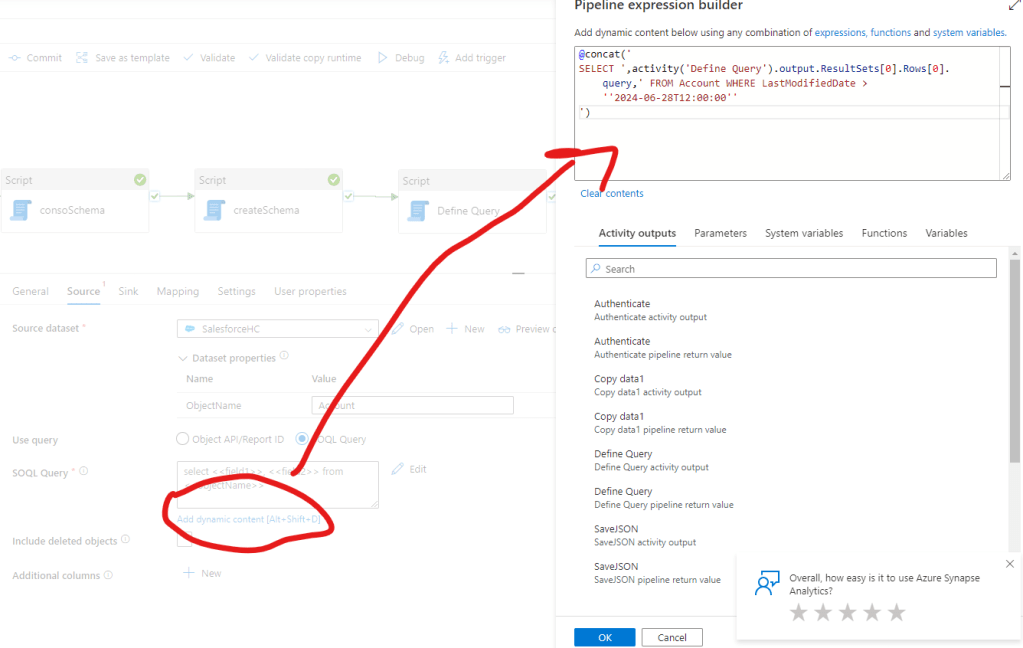
@concat(‘
SELECT ‘,activity(‘Define Query’).output.ResultSets[0].Rows[0].query,’ FROM Account WHERE LastModifiedDate > ”2024-06-28T12:00:00”
‘)
Ok, now we have another new error message 🙂
{ “errorCode”: “2200”, “message”: “Failure happened on ‘Source’ side. ErrorCode=SalesforceBulkAPIJobFailedException,’Type=Microsoft.DataTransfer.Common.Shared.HybridDeliveryException,Message=The response from Salesforce Bulk API indicates a failure. Please check the error message to understand the reason or contact Salesforce support. Error message: {\”id\”:\”750VX00000AoBPCYA3\”,\”operation\”:\”query\”,\”object\”:\”Account\”,\”createdById\”:\”0054v00000FMLeQAAX\”,\”createdDate\”:\”2024-07-01T08:18:46.000+0000\”,\”systemModstamp\”:\”2024-07-01T08:18:48.000+0000\”,\”state\”:4,\”concurrencyMode\”:\”Parallel\”,\”contentType\”:\”CSV\”,\”apiVersion\”:\”52.0\”,\”lineEnding\”:\”LF\”,\”columnDelimiter\”:\”COMMA\”,\”jobType\”:\”V2Query\”,\”numberRecordsProcessed\”:0,\”retries\”:0,\”totalProcessingTime\”:0,\”numberRecordsFailed\”:0,\”errorMessage\”:\”Failure during batch processing: ClientInputError : Query processing exception: INVALID_FIELD: \\nMAL__pc, MQL__pc FROM Account WHERE LastModifiedDate > ‘2024-06-28T12:00:00’\\n ^\\nERROR at Row:1:Column:10125\\nvalue of filter criterion for field ‘LastModifiedDate’ must be of type dateTime and should not be enclosed in quotes\”},Source=Microsoft.Connectors.Salesforce,’”, “failureType”: “UserError”, “target”: “Copy Salesforce Account”, “details”: [] }
It states that the date format is not good for the query and we need to remove the quotes for the proper value. Let’s do that, making sure about the right date-time format we can also add a formatDateTime functions to the formula:
@concat(‘
SELECT ‘,activity(‘Define Query’).output.ResultSets[0].Rows[0].query,’ FROM Account WHERE LastModifiedDate > ‘,formatDateTime(‘2024-06-28T12:00:00Z’, ‘yyyy-MM-ddTHH:mm:ssZ’)
)
And finally we succeded 🙂
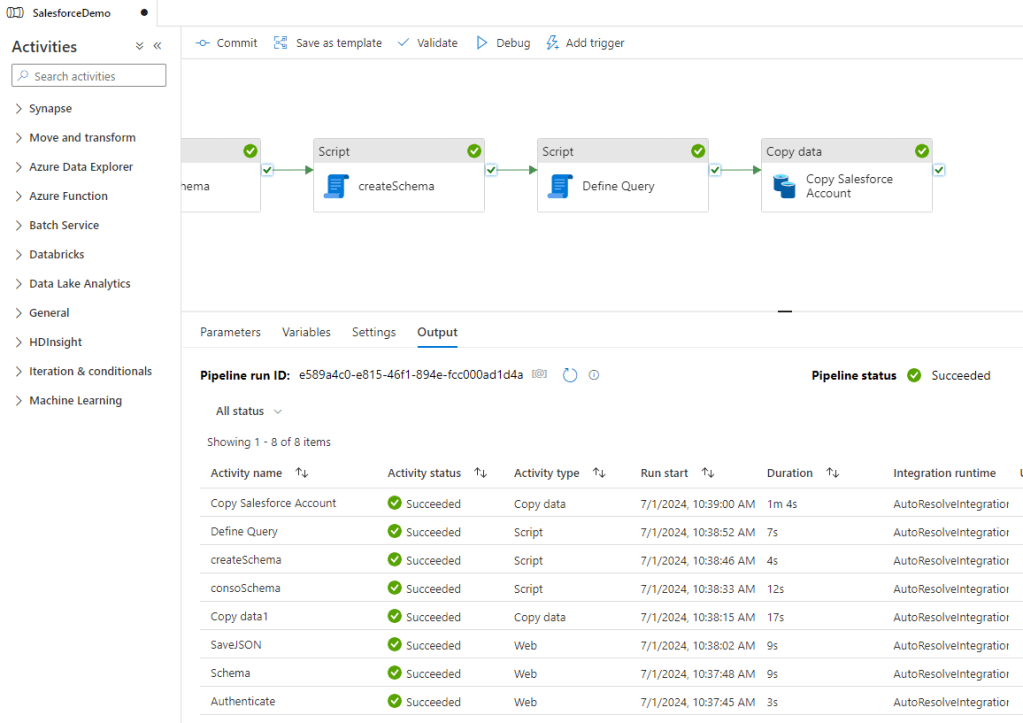
And as well the results seem to be good.
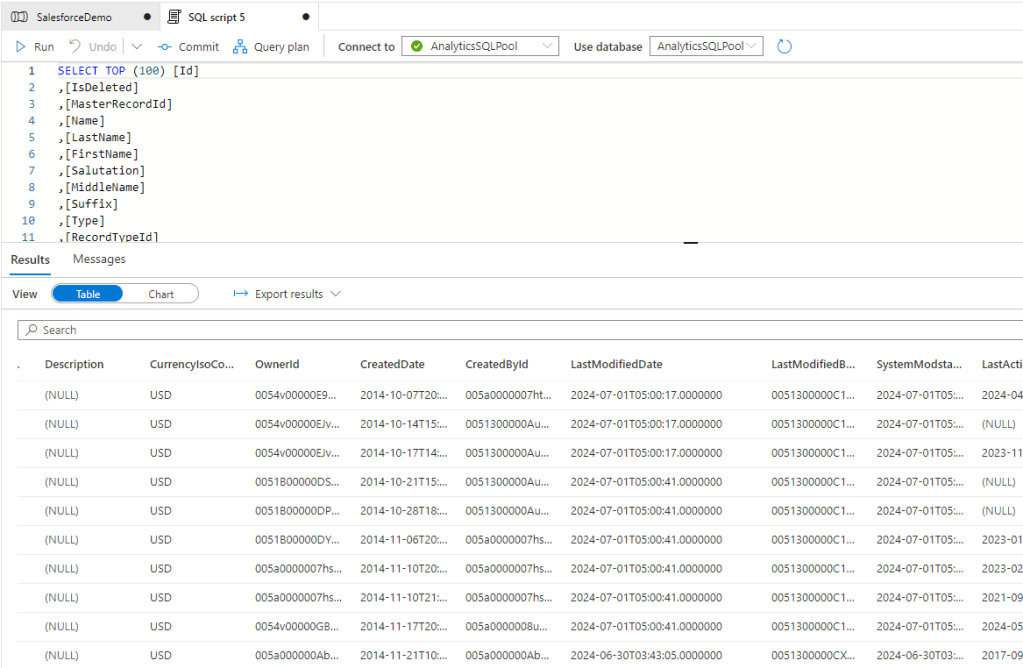
And now we are also good to go with the incremental data load.
Hope you can use it well, and again, I would definitely recommend to do the upgrade with a buffer time before the cutoff date so you can make sure the New Salesforce Connector will work for you as expected.
Cheers!
2 responses to “Upgrade Pipeline to New Salesforce Connector”
-
Our Salesforce admin warned us about using incremental loading pattern based of the LastModifiedDate column. The column is not always updated if the update was done by an automated proces, see more info on the SF docs.
LikeLike
-
That’s right. I believe this is the SystemModstamp that is recording each changes including the automated processes. For us so far it was good to use the LastModifiedDate but I agree it can vary by companies.
LikeLike
-


 Adam's Perspective on Data
Leave a comment